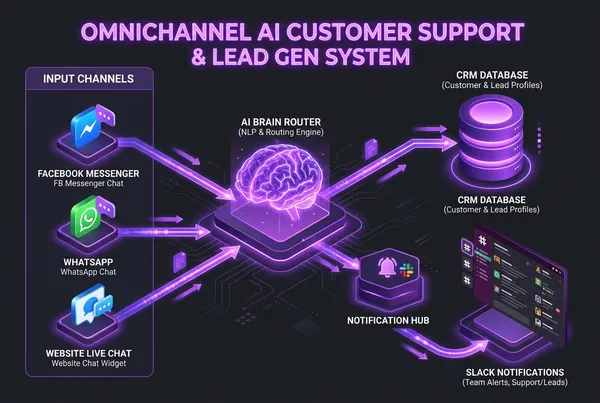
Architecting Omnichannel AI Customer Support & Automated Lead Systems
When potential customers reach out to your business—whether via your website contact widget, a Facebook ad response, or a direct Instagram message—their intent is at its highest peak.
Studies show that responding to an inbound lead within **5 minutes** increases conversion rates by up to **391%**. Yet, the average business takes over 4 hours to reply, and after business hours or during weekends, inquiries often sit unanswered for days.
Traditional chatbots failed because they relied on brittle, button-heavy decision trees ("Press 1 for Sales, Press 2 for Support"). When a prospect asked a slightly custom question, the bot looped in frustration.
By integrating modern Large Language Models (LLMs) with **event-driven webhooks** and an **omnichannel messaging engine**, businesses can provide instantaneous, human-grade customer support while autonomously qualifying leads and routing them directly into your CRM.
Here is the architectural blueprint for designing a multi-channel AI lead capture and support ecosystem.
---
## The Omnichannel Architecture Overview
```
┌──────────────────────┐ ┌──────────────────────┐ ┌──────────────────────┐
│ Website Live Chat │ │ Facebook Messenger │ │ WhatsApp Business │
└──────────┬───────────┘ └──────────┬───────────┘ └──────────┬───────────┘
│ │ │
└──────────────────────────┼──────────────────────────┘
│ Real-Time Webhook Payloads
▼
┌───────────────────────────┐
│ Meta Graph & API Hub │
│ (Verification & Auth) │
└─────────────┬─────────────┘
│
▼
┌───────────────────────────┐
│ AI Router & Context LLM │
│ (RAG Knowledge + Intent) │
└─────────────┬─────────────┘
│
┌──────────────────────────┴──────────────────────────┐
▼ ▼
┌───────────────────────────┐ ┌───────────────────────────┐
│ Conversational Support │ │ Lead Qualification Engine │
│ (RAG docs, FAQs, Policies)│ │ (Budget, Timeline, Email) │
└───────────────────────────┘ └─────────────┬─────────────┘
│ Webhook Dispatch
▼
┌───────────────────────────┐
│ CRM & Notification Sync │
│ (HubSpot, GoHighLevel, │
│ Postgres, Slack Alert) │
└───────────────────────────┘
```
---
## 1. Front-End Webhook Ingestion: Meta Graph API & Web Chat
Whether a message originates from Facebook Messenger or a custom Web Chat component on your Astro / Next.js site, every interaction triggers a normalized JSON payload to your serverless backend:
```python
from fastapi import FastAPI, Request, Response, Header
import hmac
import hashlib
import os
app = FastAPI()
APP_SECRET = os.getenv("META_APP_SECRET", "").encode()
@app.post("/webhook/meta")
async def meta_webhook(request: Request, x_hub_signature_256: str = Header(None)):
# 1. Verify Meta HMAC SHA256 Signature for security
raw_body = await request.body()
expected_hash = "sha256=" + hmac.new(APP_SECRET, raw_body, hashlib.sha256).hexdigest()
if not hmac.compare_digest(expected_hash, x_hub_signature_256 or ""):
return Response(status_code=403, content="Invalid signature")
payload = await request.json()
# 2. Extract sender PSID (Page-Scoped ID) and message text
for entry in payload.get("entry", []):
for messaging_event in entry.get("messaging", []):
if "message" in messaging_event:
sender_id = messaging_event["sender"]["id"]
message_text = messaging_event["message"].get("text", "")
await process_incoming_message(sender_id, message_text, channel="facebook")
return Response(status_code=200, content="EVENT_RECEIVED")
```
---
## 2. Intent Classification and Knowledge Retrieval (RAG)
When a message arrives, the AI Router immediately evaluates user intent:
- **Informational / Support**: "What are your pricing tiers?" or "How do I reset my API key?"
- **Transactional**: "I want to upgrade my team account."
- **Sales Inquiry**: "We have 80 staff members and need a custom voice agent system."
By connecting the agent to a hybrid vector database (**pgvector** or **Qdrant**), the AI answers factual company questions using verified documentation, eliminating hallucinations.
---
## 3. Conversational Lead Qualification (The AI SDR)
Static lead forms kill conversion. Prospects don't want to fill out a 10-field form on mobile.
The AI agent conducts conversational qualification naturally over 2–3 messages:
1. **Identify Need & Pain Point**: Understand what they are trying to solve.
2. **Determine Scope & Budget**: Quantify scale (e.g. team size, call volume, timeline).
3. **Capture & Verify Coordinates**: Collect verified email and phone number.
Once the qualification threshold is met, the agent triggers a structured function call:
```json
{
"event": "lead_qualified",
"customer": {
"name": "Sarah Jenkins",
"channel": "facebook_messenger",
"contact": "[email protected]",
"phone": "+1 (555) 234-5678"
},
"qualification": {
"company_type": "E-commerce Agency",
"monthly_budget": "$3,000 - $5,000",
"urgency": "Immediate (Within 2 weeks)",
"summary": "Looking to automate post-purchase inquiries and WhatsApp tracking."
}
}
```
---
## 4. CRM Integration & Real-Time Slack Dispatch
The moment a lead is qualified:
- **CRM Sync**: Ingested into **HubSpot**, **GoHighLevel**, or **Salesforce** with auto-assigned pipeline stages.
- **Instant Team Alert**: A rich notification is dispatched to your internal Slack or Discord `#leads` channel with a one-click button to jump directly into the live thread.
- **Smart Handoff**: If the prospect requests to speak with a human, the bot pauses automated replies and flags the conversation for a human rep in your unified inbox.
---
## 5. Critical Engineering Policies to Remember
- **Meta's 24-Hour Messaging Policy**: Facebook Messenger requires automated responses to occur within 24 hours of the user’s last message. After 24 hours, you must use approved Message Tags or transition the lead to email/SMS.
- **State Checkpointing**: If a user messages on Facebook, leaves for 3 hours, and comes back, the bot must resume state without starting the conversation from scratch.
- **Fail-Safe Fallbacks**: Never let an AI argue or loop. If sentiment analysis flags frustration, immediately route to a human: *"I want to ensure you get the best possible help. I'm connecting you directly to our lead architect now."*
---
## Ready to Turn Inbound Chats into Paying Clients?
I architect and deploy **enterprise AI customer support & lead qualification engines** that run 24/7 across websites, Facebook Messenger, WhatsApp, and CRMs.
Stop letting valuable inquiries slip through the cracks.
👉 **[Get in Touch for a Solution Consultation](/#contact)** or reach out directly at **[[email protected]](mailto:[email protected]?subject=Omnichannel%20AI%20Lead%20System%20Consultancy)** to discuss your project.
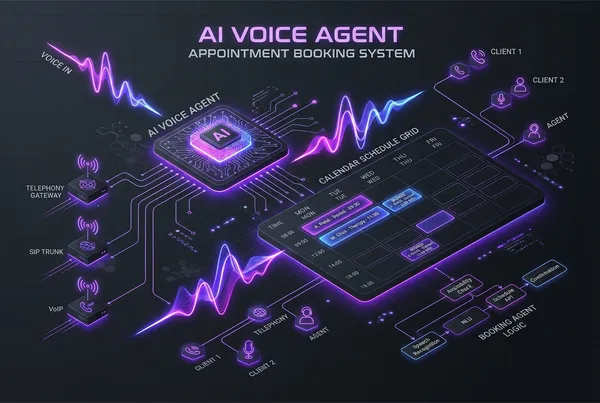
Building an Automated Appointment Booking AI Voice Assistant with Vapi, Twilio, and Cal.com
Missed calls cost service-based businesses thousands of dollars in lost revenue every month. Whether it’s a dental practice, real estate agency, law firm, or B2B consultancy, over 60% of potential clients will not leave a voicemail—they simply hang up and call a competitor.
Hiring 24/7 front-desk staff or third-party call centers is expensive, prone to human error, and rarely scales.
With modern conversational Voice AI, we can deploy an **Autonomous AI Voice Receptionist** that answers incoming calls within one ring, answers complex business questions conversationally, checks live calendar availability, and books appointments directly into your schedule—with zero human intervention.
In this guide, I will break down the end-to-end architecture for building an automated booking voice agent using **Vapi**, **Twilio**, and **Cal.com**.
---
## High-Level System Architecture
```
Caller (Phone/PSTN)
│
▼
┌──────────────┐
│ Twilio Voice │ (Inbound SIP Trunk / Carrier Gateway)
└──────┬───────┘
│ Bidirectional Audio Stream
▼
┌──────────────┐
│ Vapi AI │ (STT: Deepgram Nova-2 + LLM: GPT-4o / Claude + TTS: Cartesia)
└──────┬───────┘
│ Function / Tool Calling Webhook
▼
┌──────────────┐
│ FastAPI / │ (Middleware: Timezone normalization & Slot Validation)
│ n8n Webhook │
└──────┬───────┘
│ REST API
▼
┌──────────────┐
│ Cal.com API │ (Real-Time Slot Availability & Event Creation)
└──────┬───────┘
│
├──> Google Calendar / Outlook Sync
├──> Twilio SMS Confirmation to Caller
└──> CRM Update (HubSpot, GoHighLevel, Supabase)
```
---
## 1. The Real-Time Voice Pipeline (Vapi)
A voice bot must feel natural. If the caller experiences a 2-second pause after speaking, the illusion breaks. Vapi orchestrates the low-latency triangle:
1. **Speech-to-Text (STT)**: Deepgram Nova-2 with streaming transcripts (sub-150ms).
2. **Intelligence (LLM)**: GPT-4o mini or Claude 3.5 Haiku with streaming tokens and strict tool calling definitions.
3. **Text-to-Speech (TTS)**: Cartesia Sonic or ElevenLabs Turbo v2.5 delivering natural emotional inflection and immediate audio buffering.
Vapi handles **barge-in** out of the box. When the caller interrupts the AI ("Wait, do you have anything after 3 PM instead?"), Vapi instantly cancels the active audio buffer and re-prompts the model.
---
## 2. Defining the Tool Calling Schema
To allow the voice agent to interact with your booking engine, we configure two distinct server-side tools in Vapi:
### Tool 1: `check_available_slots`
Triggered when the caller asks about availability:
```json
{
"name": "check_available_slots",
"description": "Checks available calendar booking slots for a given date range.",
"parameters": {
"type": "object",
"properties": {
"date": {
"type": "string",
"description": "Target date in YYYY-MM-DD format (e.g., 2026-11-04)"
},
"timezone": {
"type": "string",
"description": "Caller timezone, defaults to America/New_York"
}
},
"required": ["date"]
},
"server": {
"url": "https://api.yourdomain.com/v1/voice/slots"
}
}
```
### Tool 2: `book_appointment`
Triggered once the caller confirms a specific date, time, and contact information:
```json
{
"name": "book_appointment",
"description": "Reserves and confirms an appointment on Cal.com.",
"parameters": {
"type": "object",
"properties": {
"start_time": {
"type": "string",
"description": "ISO 8601 timestamp of chosen slot (e.g. 2026-11-04T15:00:00Z)"
},
"caller_name": {
"type": "string",
"description": "Full name of the caller"
},
"caller_phone": {
"type": "string",
"description": "Phone number for SMS reminder"
},
"caller_email": {
"type": "string",
"description": "Email address for calendar invite"
}
},
"required": ["start_time", "caller_name", "caller_phone"]
},
"server": {
"url": "https://api.yourdomain.com/v1/voice/book"
}
}
```
---
## 3. Implementing the Middleware with FastAPI & Cal.com API
Here is how the backend webhook handler processes slot checks and books the appointment in Python:
```python
from fastapi import FastAPI, HTTPException
from pydantic import BaseModel
import httpx
import os
app = FastAPI()
CALCOM_API_KEY = os.getenv("CALCOM_API_KEY")
EVENT_TYPE_ID = int(os.getenv("CALCOM_EVENT_TYPE_ID", "124801"))
@app.post("/v1/voice/slots")
async def check_slots(payload: dict):
target_date = payload["message"]["toolCalls"][0]["function"]["arguments"]["date"]
async with httpx.AsyncClient() as client:
res = await client.get(
f"https://api.cal.com/v2/slots/available",
params={
"eventTypeId": EVENT_TYPE_ID,
"startTime": f"{target_date}T00:00:00Z",
"endTime": f"{target_date}T23:59:59Z",
},
headers={"Authorization": f"Bearer {CALCOM_API_KEY}"}
)
slots_data = res.json().get("data", {}).get("slots", {})
available_times = [slot["time"] for slot in slots_data.get(target_date, [])]
if not available_times:
return {"result": f"No available openings on {target_date}. Suggest alternative dates."}
# Return formatted readable times for the voice agent
readable_slots = [t.split("T")[1][:5] for t in available_times[:3]]
return {"result": f"Available times on {target_date}: {', '.join(readable_slots)}"}
```
---
## 4. Post-Call Automation & SMS Follow-Up
The customer experience shouldn’t stop when the phone call ends:
1. **Vapi End-of-Call Webhook**: Fires immediately upon hang-up with structured variables (`duration`, `recording_url`, `transcript`, `summary`).
2. **Instant SMS via Twilio**:
> *"Hi John! Your appointment with Dr. Miller is confirmed for Wednesday, Nov 4 at 3:00 PM. Here is your calendar link: cal.com/b/98124. Reply STOP to cancel."*
3. **CRM Sync**: Updates contact records in HubSpot, GoHighLevel, or Salesforce, tagging the lead source as `Voice AI Receptionist`.
---
## 5. Production Hardening: Avoiding Common Pitfalls
- **Timezone Discrepancies**: Never let the LLM guess UTC offsets. Always enforce explicit timezones in the system prompt based on the Twilio phone number prefix or customer profile.
- **Race Conditions**: If two callers attempt to book the same slot simultaneously, handle Cal.com `409 Conflict` gracefully with a fallback: *"That slot was just claimed a moment ago. How does 3:30 PM sound instead?"*
- **Human Transfer Fallbacks**: If the caller expresses frustration or requests human assistance, trigger an immediate SIP transfer (`transferCall` action) to route the call to a human supervisor.
---
## Ready to Deploy a Voice AI Agent for Your Business?
I help companies, clinics, and agencies design and deploy **custom, high-conversion Voice AI agents** that run 24/7 without dropped calls or awkward pauses.
If you want to automate your inbound bookings, qualify leads automatically, or integrate telephony into your CRM:
👉 **[Book a Discovery Call](/#contact)** or email me directly at **[[email protected]](mailto:[email protected]?subject=Voice%20AI%20Booking%20Assistant%20Project)** to discuss your architecture.
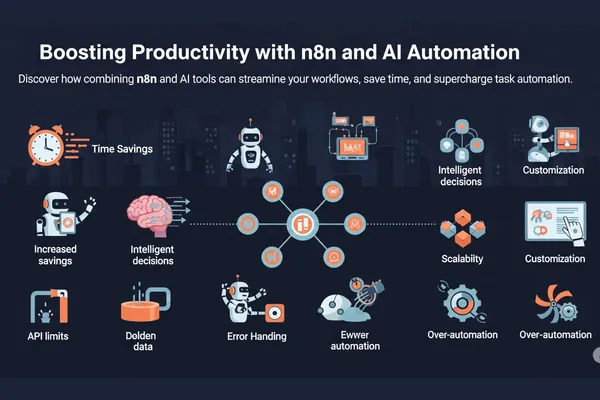
Boosting Productivity with n8n and AI Automation
Automation isn’t just a buzzword anymore — it’s a practical solution for streamlining repetitive tasks, enhancing productivity, and enabling creators, teams, and entrepreneurs to focus on what really matters. Combining **n8n**, the open-source workflow automation tool, with the power of **AI** opens up endless possibilities for building smart, efficient systems across your workspace.
## Introduction
**n8n** allows you to build automated workflows with simple drag-and-drop logic, connecting over 300 services like Google Sheets, Notion, Slack, and databases — all without writing a line of code (though you can add code for advanced logic). When you integrate **AI tools** like OpenAI, Hugging Face, or LangChain into your workflows, you go beyond simple automation — you begin to *reason, summarize, and make decisions automatically*.
Whether it’s drafting emails, sorting customer queries, generating SEO content, or automating data cleanup, the combination of n8n and AI turns your daily operations into a self-sustaining, intelligent machine.
## Benefits
The benefits of pairing n8n with AI automation are numerous:
- **Time Savings**: Automate repetitive tasks like lead routing, email follow-ups, or content scheduling — no more manual busywork.
- **Intelligent Decisions**: Use AI models to score leads, classify text, summarize documents, or even answer customer queries in real-time.
- **Scalability**: Once built, workflows can run 24/7 without human intervention — perfect for solopreneurs and growing teams.
- **Customization**: With JavaScript functions and HTTP request nodes in n8n, you can connect to any AI API and tailor outputs for your specific needs.
For example, a typical content workflow might take a blog topic, generate an outline using GPT-4, push it to Notion, and notify your team in Slack — all without a single manual step.
## Challenges
Despite its power, automation isn’t without hurdles. AI outputs still require oversight to ensure quality and accuracy, and setting up complex workflows in n8n might have a learning curve for non-technical users. Here are some common challenges:
- **API limits & costs**: Many AI tools charge per request, so scaling requires careful monitoring.
- **Error handling**: Automated workflows need to be designed with fallback logic in case something breaks (e.g., API downtime).
- **Over-automation**: Relying too much on AI can sometimes lead to generic or impersonal content, so human-in-the-loop systems are ideal.
With thoughtful setup and regular review, however, these issues can be mitigated — and the gains in efficiency far outweigh the costs.
## Conclusion
The fusion of **n8n** and **AI automation** is a game-changer for anyone looking to streamline their digital operations. From handling emails to building content pipelines to analyzing customer feedback, this duo lets you create workflows that think and act on your behalf.
As automation becomes more accessible, the question isn’t *if* you should automate — it’s *how much*. Whether you’re a freelancer, a startup, or a creative studio, embracing AI automation today can unlock the bandwidth you need to grow tomorrow.