Architecting Omnichannel AI Customer Support & Automated Lead Systems
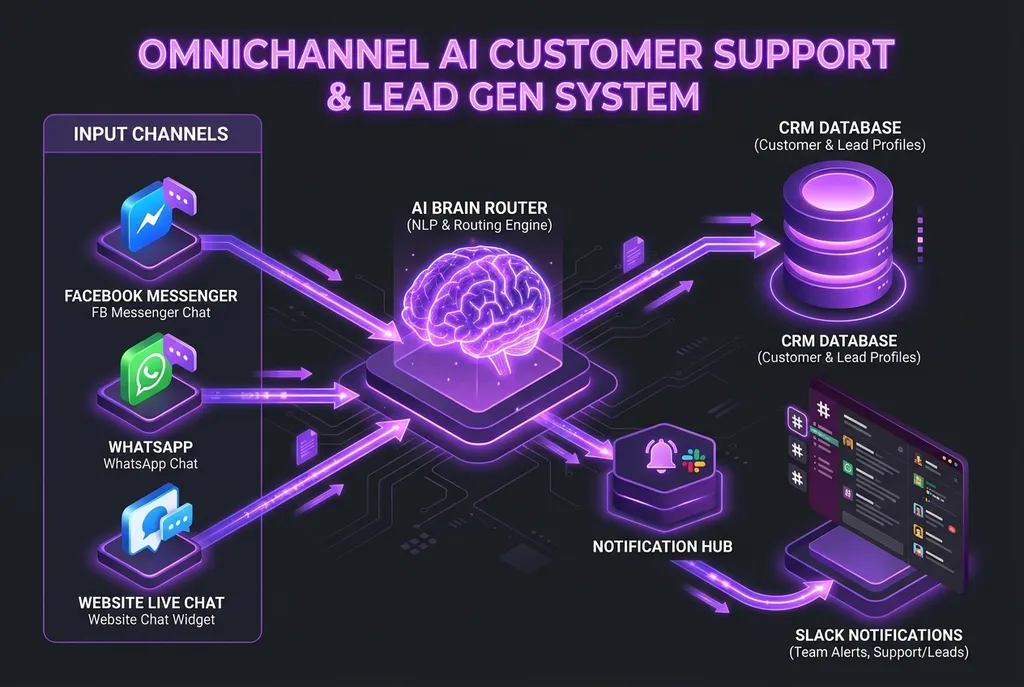
When potential customers reach out to your business—whether via your website contact widget, a Facebook ad response, or a direct Instagram message—their intent is at its highest peak.
Studies show that responding to an inbound lead within 5 minutes increases conversion rates by up to 391%. Yet, the average business takes over 4 hours to reply, and after business hours or during weekends, inquiries often sit unanswered for days.
Traditional chatbots failed because they relied on brittle, button-heavy decision trees (“Press 1 for Sales, Press 2 for Support”). When a prospect asked a slightly custom question, the bot looped in frustration.
By integrating modern Large Language Models (LLMs) with event-driven webhooks and an omnichannel messaging engine, businesses can provide instantaneous, human-grade customer support while autonomously qualifying leads and routing them directly into your CRM.
Here is the architectural blueprint for designing a multi-channel AI lead capture and support ecosystem.
The Omnichannel Architecture Overview
 ┌──────────────────────┐   ┌──────────────────────┐   ┌──────────────────────┐
 │ Website Live Chat    │   │ Facebook Messenger   │   │ WhatsApp Business    │
 └──────────┬───────────┘   └──────────┬───────────┘   └──────────┬───────────┘
            │                          │                          │
            └──────────────────────────┼──────────────────────────┘
                                       │ Real-Time Webhook Payloads
                                       ▼
                         ┌───────────────────────────┐
                         │   Meta Graph & API Hub    │
                         │   (Verification & Auth)   │
                         └─────────────┬─────────────┘
                                       │
                                       ▼
                         ┌───────────────────────────┐
                         │  AI Router & Context LLM  │
                         │  (RAG Knowledge + Intent) │
                         └─────────────┬─────────────┘
                                       │
            ┌──────────────────────────┴──────────────────────────┐
            ▼                                                     ▼
┌───────────────────────────┐                         ┌───────────────────────────┐
│ Conversational Support    │                         │ Lead Qualification Engine │
│ (RAG docs, FAQs, Policies)│                         │ (Budget, Timeline, Email) │
└───────────────────────────┘                         └─────────────┬─────────────┘
                                                                    │ Webhook Dispatch
                                                                    ▼
                                                      ┌───────────────────────────┐
                                                      │ CRM & Notification Sync   │
                                                      │ (HubSpot, GoHighLevel,    │
                                                      │  Postgres, Slack Alert)   │
                                                      └───────────────────────────┘
1. Front-End Webhook Ingestion: Meta Graph API & Web Chat
Whether a message originates from Facebook Messenger or a custom Web Chat component on your Astro / Next.js site, every interaction triggers a normalized JSON payload to your serverless backend:
from fastapi import FastAPI, Request, Response, Header
import hmac
import hashlib
import os

app = FastAPI()
APP_SECRET = os.getenv("META_APP_SECRET", "").encode()

@app.post("/webhook/meta")
async def meta_webhook(request: Request, x_hub_signature_256: str = Header(None)):
    # 1. Verify Meta HMAC SHA256 Signature for security
    raw_body = await request.body()
    expected_hash = "sha256=" + hmac.new(APP_SECRET, raw_body, hashlib.sha256).hexdigest()

    if not hmac.compare_digest(expected_hash, x_hub_signature_256 or ""):
        return Response(status_code=403, content="Invalid signature")

    payload = await request.json()

    # 2. Extract sender PSID (Page-Scoped ID) and message text
    for entry in payload.get("entry", []):
        for messaging_event in entry.get("messaging", []):
            if "message" in messaging_event:
                sender_id = messaging_event["sender"]["id"]
                message_text = messaging_event["message"].get("text", "")
                await process_incoming_message(sender_id, message_text, channel="facebook")

    return Response(status_code=200, content="EVENT_RECEIVED")
2. Intent Classification and Knowledge Retrieval (RAG)
When a message arrives, the AI Router immediately evaluates user intent:
- Informational / Support: “What are your pricing tiers?” or “How do I reset my API key?”
- Transactional: “I want to upgrade my team account.”
- Sales Inquiry: “We have 80 staff members and need a custom voice agent system.”
By connecting the agent to a hybrid vector database (pgvector or Qdrant), the AI answers factual company questions using verified documentation, eliminating hallucinations.
3. Conversational Lead Qualification (The AI SDR)
Static lead forms kill conversion. Prospects don’t want to fill out a 10-field form on mobile.
The AI agent conducts conversational qualification naturally over 2–3 messages:
- Identify Need & Pain Point: Understand what they are trying to solve.
- Determine Scope & Budget: Quantify scale (e.g. team size, call volume, timeline).
- Capture & Verify Coordinates: Collect verified email and phone number.
Once the qualification threshold is met, the agent triggers a structured function call:
{
  "event": "lead_qualified",
  "customer": {
    "name": "Sarah Jenkins",
    "channel": "facebook_messenger",
    "contact": "[email protected]",
    "phone": "+1 (555) 234-5678"
  },
  "qualification": {
    "company_type": "E-commerce Agency",
    "monthly_budget": "$3,000 - $5,000",
    "urgency": "Immediate (Within 2 weeks)",
    "summary": "Looking to automate post-purchase inquiries and WhatsApp tracking."
  }
}
4. CRM Integration & Real-Time Slack Dispatch
The moment a lead is qualified:
- CRM Sync: Ingested into HubSpot, GoHighLevel, or Salesforce with auto-assigned pipeline stages.
- Instant Team Alert: A rich notification is dispatched to your internal Slack or Discord
#leadschannel with a one-click button to jump directly into the live thread. - Smart Handoff: If the prospect requests to speak with a human, the bot pauses automated replies and flags the conversation for a human rep in your unified inbox.
5. Critical Engineering Policies to Remember
- Meta’s 24-Hour Messaging Policy: Facebook Messenger requires automated responses to occur within 24 hours of the user’s last message. After 24 hours, you must use approved Message Tags or transition the lead to email/SMS.
- State Checkpointing: If a user messages on Facebook, leaves for 3 hours, and comes back, the bot must resume state without starting the conversation from scratch.
- Fail-Safe Fallbacks: Never let an AI argue or loop. If sentiment analysis flags frustration, immediately route to a human: “I want to ensure you get the best possible help. I’m connecting you directly to our lead architect now.”
Ready to Turn Inbound Chats into Paying Clients?
I architect and deploy enterprise AI customer support & lead qualification engines that run 24/7 across websites, Facebook Messenger, WhatsApp, and CRMs.
Stop letting valuable inquiries slip through the cracks.
👉 Get in Touch for a Solution Consultation or reach out directly at [email protected] to discuss your project.