Architecting and Deploying Full-Stack Applications to Production Cloud with Docker, Nginx, and GitHub Actions

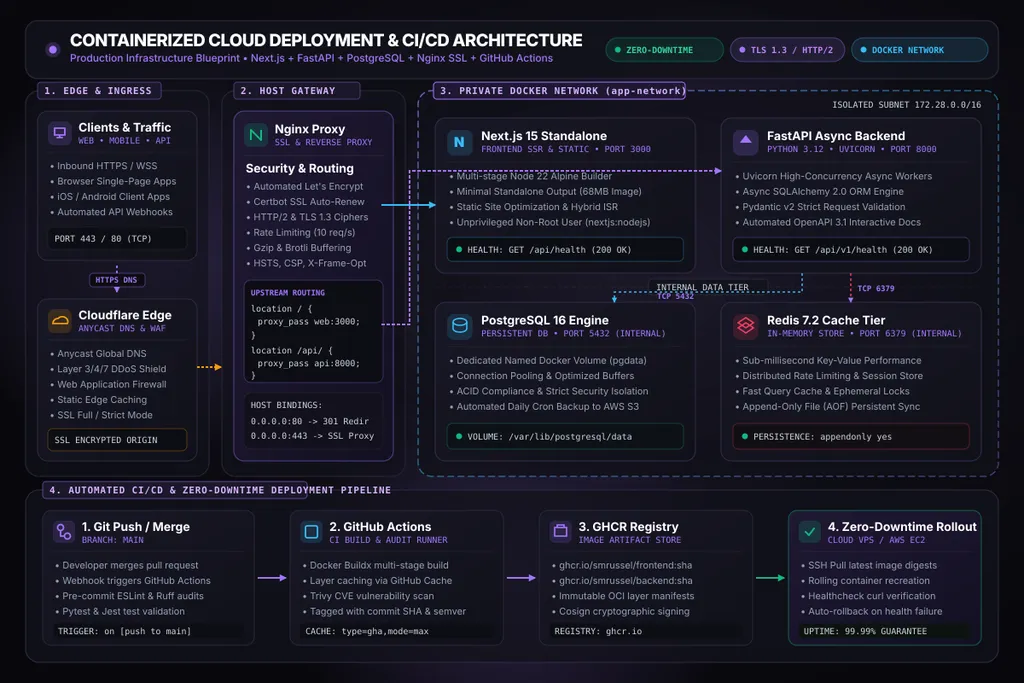
Deploying full-stack web applications into production is one of the most critical inflection points in software engineering. While modern serverless platforms offer magical one-click staging experiences, real-world enterprise applications quickly run into severe structural bottlenecks: unpredictable utility pricing bills, cold-start latencies on asynchronous worker pipelines, restrictive 15-minute function timeouts, and database connection pool exhaustion.
The proven alternative adopted by high-efficiency engineering teams is self-hosted, containerized cloud infrastructure. By pairing a high-performance Cloud VPS (Hetzner, DigitalOcean, Linode) or AWS EC2 instance with Docker Compose, a hardened Nginx reverse proxy, and automated GitHub Actions CI/CD, you achieve:
- Predictable, fixed cloud costs (often 80–90% cheaper than equivalent PaaS tiers).
- Sub-50ms Time-To-First-Byte (TTFB) with full control over in-memory cache and kernel parameters.
- Zero vendor lock-in through standard Open Container Initiative (OCI) images.
- True zero-downtime rolling deployments without dropped user connections.
In this comprehensive guide, we will step through every architectural layer required to build, secure, and deploy a production-grade stack consisting of a Next.js 15 SSR frontend, a FastAPI asynchronous backend, a PostgreSQL 16 relational database, and a Redis in-memory cache.
High-Level Cloud Deployment Topology
Before writing configuration files, let us analyze the complete end-to-end traffic flow and security boundary:
[ Web Browsers & Mobile Clients ]
               │
               │ HTTPS (TLS 1.3 / Port 443)
               ▼
[ Cloudflare Edge Network ] ──► Anycast DNS, DDoS Mitigation, WAF, Static Edge CDN
               │
               │ Encrypted Origin Connection
               ▼
   [ Cloud VPS / AWS EC2 Host Boundary ]
   ┌─────────────────────────────────────────────────────────────┐
   │ [ Host Nginx Reverse Proxy ]                                │
   │   - Let's Encrypt Certbot Auto-Renew                        │
   │   - HTTP/2 & Gzip/Brotli Compression                        │
   │   - Rate Limiting (limit_req: 10 req/s)                     │
   │   - Path-based upstream proxy routing                       │
   │                     │                                       │
   │                     │ Internal Bridge Network (app-network) │
   │         ┌───────────┴───────────┐                           │
   │         ▼                       ▼                           │
   │  [ Next.js 15 ]          [ FastAPI Async ]                  │
   │  web:3000 (Node 22)      api:8000 (Python 3.12)             │
   │         │                       │                           │
   │         │       ┌───────────────┤                           │
   │         ▼       ▼               ▼                           │
   │    [ Redis 7.2 ]         [ PostgreSQL 16 ]                  │
   │    cache:6379 (AOF)      db:5432 (pgdata volume)            │
   │                                 │                           │
   └─────────────────────────────────┼───────────────────────────┘
                                     │ Automated Encrypted Nightly Cron
                                     ▼
                      [ Offsite AWS S3 / Cloudflare R2 ]
The Three Security Commandments of this Architecture:
- Never expose the database or cache to the public internet: PostgreSQL (
db:5432) and Redis (cache:6379) do not publish host port bindings. They communicate exclusively across the internal Docker bridge network (app-network). - Run containers as unprivileged users: Never execute container workloads as
root. We provision explicit system users inside our multi-stage Dockerfiles. - Automate everything into immutable artifacts: Build once on the CI runner, run automated tests, sign and push to GitHub Container Registry (GHCR), and roll out atomically.
1. Production Next.js 15 Multi-Stage Dockerfile
A default Next.js build includes development dependencies, build tools, and cache files that balloon the final image to over 1.4 GB. By leveraging Next.js Standalone Output Mode, we compile the entire server into a tiny, self-contained Node.js bundle of less than 70 MB.
Step 1: Configure next.config.js
Ensure your Next.js configuration enables standalone output:
// next.config.js
/** @type {import('next').NextConfig} */
const nextConfig = {
  output: 'standalone',
  poweredByHeader: false,
  compress: true,
};

module.exports = nextConfig;
Step 2: The Multi-Stage Dockerfile
Place this Dockerfile in your Next.js project root:
# syntax=docker/dockerfile:1.4
# ==============================================================================
# STAGE 1: Dependency Caching Base
# ==============================================================================
FROM node:22-alpine AS deps
RUN apk add --no-cache libc6-compat
WORKDIR /app

# Cache package manifests for maximum layer reuse
COPY package.json package-lock.json ./
RUN npm ci --legacy-peer-deps

# ==============================================================================
# STAGE 2: Application Builder
# ==============================================================================
FROM node:22-alpine AS builder
WORKDIR /app
COPY --from=deps /app/node_modules ./node_modules
COPY . .

# Pass build-time public environment variables
ARG NEXT_PUBLIC_API_URL
ENV NEXT_PUBLIC_API_URL=${NEXT_PUBLIC_API_URL}
ENV NEXT_TELEMETRY_DISABLED=1
ENV NODE_ENV=production

RUN npm run build

# ==============================================================================
# STAGE 3: Minimal Production Runtime
# ==============================================================================
FROM node:22-alpine AS runner
WORKDIR /app

ENV NODE_ENV=production
ENV PORT=3000
ENV HOSTNAME="0.0.0.0"
ENV NEXT_TELEMETRY_DISABLED=1

# Security: Create non-root system user and group
RUN addgroup --system --gid 1001 nodejs && \
    adduser --system --uid 1001 nextjs

# Copy static assets and compiled standalone bundle
COPY --from=builder /app/public ./public
COPY --from=builder --chown=nextjs:nodejs /app/.next/standalone ./
COPY --from=builder --chown=nextjs:nodejs /app/.next/static ./.next/static

USER nextjs

EXPOSE 3000

# Native healthcheck for container orchestrators
HEALTHCHECK --interval=15s --timeout=5s --retries=3 --start-period=10s \
  CMD wget --no-verbose --tries=1 --spider http://127.0.0.1:3000/api/health || exit 1

CMD ["node", "server.js"]
2. Production FastAPI Multi-Stage Dockerfile
Python deployments frequently suffer from oversized images caused by C-compilers (gcc, make) needed to build native binary packages (such as asyncpg or cryptography). A multi-stage build allows us to compile binary wheels in a build container, then transfer only the compiled virtual environment into a slim runtime container.
# syntax=docker/dockerfile:1.4
# ==============================================================================
# STAGE 1: Builder with C Compilers & Native Toolchains
# ==============================================================================
FROM python:3.12-slim-bookworm AS builder

WORKDIR /build

ENV PYTHONDONTWRITEBYTECODE=1 \
    PYTHONUNBUFFERED=1 \
    PIP_NO_CACHE_DIR=1 \
    PIP_DISABLE_PIP_VERSION_CHECK=1

# Install build-time system headers
RUN apt-get update && apt-get install -y --no-install-recommends \
    build-essential \
    libpq-dev \
    curl \
    && rm -rf /var/lib/apt/lists/*

# Create virtual environment
RUN python -m venv /opt/venv
ENV PATH="/opt/venv/bin:$PATH"

COPY requirements.txt .
RUN pip install --upgrade pip && \
    pip install -r requirements.txt

# ==============================================================================
# STAGE 2: Distroless-like Slim Runtime
# ==============================================================================
FROM python:3.12-slim-bookworm AS runner

WORKDIR /app

ENV PYTHONDONTWRITEBYTECODE=1 \
    PYTHONUNBUFFERED=1 \
    PATH="/opt/venv/bin:$PATH" \
    PORT=8000

# Install only minimal runtime shared libraries (libpq for postgres)
RUN apt-get update && apt-get install -y --no-install-recommends \
    libpq5 \
    curl \
    && rm -rf /var/lib/apt/lists/*

# Security: Create unprivileged system user
RUN groupadd -g 10001 appgroup && \
    useradd -u 10001 -g appgroup -s /bin/false -M appuser

# Copy virtual environment from builder
COPY --from=builder --chown=appuser:appgroup /opt/venv /opt/venv

# Copy application source code
COPY --chown=appuser:appgroup . /app

USER appuser

EXPOSE 8000

HEALTHCHECK --interval=15s --timeout=5s --retries=3 --start-period=10s \
  CMD curl -f http://127.0.0.1:8000/api/v1/health || exit 1

# Run Uvicorn with 4 concurrent async workers
CMD ["uvicorn", "main:app", "--host", "0.0.0.0", "--port", "8000", "--workers", "4", "--proxy-headers", "--forwarded-allow-ips", "*"]
3. Production Docker Compose Orchestration
Our docker-compose.prod.yml defines the entire multi-container service graph, enforcing healthcheck dependencies, restart policies, resource limits, and network isolation:
version: "3.9"

# ==============================================================================
# Isolated Internal Network
# ==============================================================================
networks:
  app-network:
    driver: bridge
    ipam:
      driver: default
      config:
        - subnet: 172.28.0.0/16

# ==============================================================================
# Persistent Named Storage Volumes
# ==============================================================================
volumes:
  postgres_data:
    driver: local
  redis_data:
    driver: local
  certbot_www:
    driver: local
  certbot_conf:
    driver: local

# ==============================================================================
# Services
# ==============================================================================
services:
  # ----------------------------------------------------------------------------
  # Nginx Reverse Proxy (Public Ingress)
  # ----------------------------------------------------------------------------
  nginx:
    image: nginx:1.27-alpine
    container_name: prod_nginx
    restart: unless-stopped
    ports:
      - "80:80"
      - "443:443"
    volumes:
      - ./nginx/nginx.conf:/etc/nginx/nginx.conf:ro
      - ./nginx/conf.d:/etc/nginx/conf.d:ro
      - certbot_www:/var/www/certbot:ro
      - certbot_conf:/etc/letsencrypt:ro
    networks:
      - app-network
    depends_on:
      web:
        condition: service_healthy
      api:
        condition: service_healthy
    logging:
      driver: "json-file"
      options:
        max-size: "10m"
        max-file: "3"

  # ----------------------------------------------------------------------------
  # Next.js 15 Standalone Web Container
  # ----------------------------------------------------------------------------
  web:
    image: ghcr.io/smrussel/portfolio-frontend:${IMAGE_TAG:-latest}
    container_name: prod_web
    restart: unless-stopped
    expose:
      - "3000"
    environment:
      - NODE_ENV=production
      - PORT=3000
      - NEXT_PUBLIC_API_URL=https://smrussel.me/api
    networks:
      - app-network
    healthcheck:
      test: ["CMD", "wget", "--no-verbose", "--tries=1", "--spider", "http://localhost:3000/api/health"]
      interval: 10s
      timeout: 5s
      retries: 3
      start_period: 15s
    deploy:
      resources:
        limits:
          cpus: "1.00"
          memory: 1024M

  # ----------------------------------------------------------------------------
  # FastAPI Async Backend Container
  # ----------------------------------------------------------------------------
  api:
    image: ghcr.io/smrussel/portfolio-backend:${IMAGE_TAG:-latest}
    container_name: prod_api
    restart: unless-stopped
    expose:
      - "8000"
    environment:
      - ENVIRONMENT=production
      - DATABASE_URL=postgresql+asyncpg://${POSTGRES_USER}:${POSTGRES_PASSWORD}@db:5432/${POSTGRES_DB}
      - REDIS_URL=redis://:${REDIS_PASSWORD}@cache:6379/0
    networks:
      - app-network
    depends_on:
      db:
        condition: service_healthy
      cache:
        condition: service_healthy
    healthcheck:
      test: ["CMD", "curl", "-f", "http://localhost:8000/api/v1/health"]
      interval: 10s
      timeout: 5s
      retries: 3
      start_period: 15s
    deploy:
      resources:
        limits:
          cpus: "1.50"
          memory: 1536M

  # ----------------------------------------------------------------------------
  # PostgreSQL 16 Relational Database (Internal Only)
  # ----------------------------------------------------------------------------
  db:
    image: postgres:16-alpine
    container_name: prod_db
    restart: unless-stopped
    expose:
      - "5432"
    environment:
      POSTGRES_USER: ${POSTGRES_USER}
      POSTGRES_PASSWORD: ${POSTGRES_PASSWORD}
      POSTGRES_DB: ${POSTGRES_DB}
    volumes:
      - postgres_data:/var/lib/postgresql/data
    networks:
      - app-network
    healthcheck:
      test: ["CMD-SHELL", "pg_isready -U ${POSTGRES_USER} -d ${POSTGRES_DB}"]
      interval: 5s
      timeout: 5s
      retries: 5
    deploy:
      resources:
        limits:
          memory: 2048M

  # ----------------------------------------------------------------------------
  # Redis 7.2 In-Memory Cache (Internal Only)
  # ----------------------------------------------------------------------------
  cache:
    image: redis:7.2-alpine
    container_name: prod_cache
    restart: unless-stopped
    command: ["redis-server", "--appendonly", "yes", "--requirepass", "${REDIS_PASSWORD}"]
    expose:
      - "6379"
    volumes:
      - redis_data:/data
    networks:
      - app-network
    healthcheck:
      test: ["CMD", "redis-cli", "-a", "${REDIS_PASSWORD}", "ping"]
      interval: 5s
      timeout: 3s
      retries: 5
4. Hardened Nginx Reverse Proxy Configuration
Nginx acts as the gatekeeper. We configure TLS 1.3 encryption, automatic Let’s Encrypt challenges, proxy buffer tuning, rate limiting, and strict security headers.
nginx/nginx.conf
user nginx;
worker_processes auto;
worker_rlimit_nofile 65535;
pid /var/run/nginx.pid;

events {
    worker_connections 8192;
    multi_accept on;
    use epoll;
}

http {
    include /etc/nginx/mime.types;
    default_type application/octet-stream;

    # Performance Tuning
    sendfile on;
    tcp_nopush on;
    tcp_nodelay on;
    keepalive_timeout 65;
    types_hash_max_size 2048;
    server_tokens off;

    # Logging format with upstream response time
    log_format production '$remote_addr - $remote_user [$time_local] '
                          '"$request" $status $body_bytes_sent '
                          '"$http_referer" "$http_user_agent" '
                          'rt=$request_time uct="$upstream_connect_time" uht="$upstream_header_time" urt="$upstream_response_time"';

    access_log /var/log/nginx/access.log production buffer=16k;
    error_log /var/log/nginx/error.log warn;

    # Compression
    gzip on;
    gzip_vary on;
    gzip_proxied any;
    gzip_comp_level 6;
    gzip_types text/plain text/css application/json application/javascript text/xml application/xml application/xml+rss text/javascript image/svg+xml;

    # Rate Limiting Zones
    limit_req_zone $binary_remote_addr zone=api_limit:10m rate=15r/s;
    limit_req_zone $binary_remote_addr zone=auth_limit:10m rate=3r/s;

    include /etc/nginx/conf.d/*.conf;
}
nginx/conf.d/default.conf
# Upstream Service Definitions
upstream nextjs_upstream {
    server web:3000 max_fails=3 fail_timeout=10s;
    keepalive 32;
}

upstream fastapi_upstream {
    server api:8000 max_fails=3 fail_timeout=10s;
    keepalive 32;
}

# HTTP: Redirect all traffic to HTTPS (with ACME challenge support)
server {
    listen 80;
    listen [::]:80;
    server_name smrussel.me www.smrussel.me;

    # Certbot webroot ACME challenge location
    location /.well-known/acme-challenge/ {
        root /var/www/certbot;
        allow all;
    }

    location / {
        return 301 https://$host$request_uri;
    }
}

# HTTPS: Secure Production Gateway
server {
    listen 443 ssl http2;
    listen [::]:443 ssl http2;
    server_name smrussel.me www.smrussel.me;

    # SSL Certificates (managed via Certbot)
    ssl_certificate /etc/letsencrypt/live/smrussel.me/fullchain.pem;
    ssl_certificate_key /etc/letsencrypt/live/smrussel.me/privkey.pem;

    # Modern TLS Hardening
    ssl_protocols TLSv1.2 TLSv1.3;
    ssl_ciphers ECDHE-ECDSA-AES128-GCM-SHA256:ECDHE-RSA-AES128-GCM-SHA256:ECDHE-ECDSA-AES256-GCM-SHA384:ECDHE-RSA-AES256-GCM-SHA384;
    ssl_prefer_server_ciphers off;
    ssl_session_cache shared:SSL:10m;
    ssl_session_timeout 1d;
    ssl_session_tickets off;

    # Security Headers
    add_header X-Frame-Options "DENY" always;
    add_header X-Content-Type-Options "nosniff" always;
    add_header X-XSS-Protection "1; mode=block" always;
    add_header Referrer-Policy "strict-origin-when-cross-origin" always;
    add_header Strict-Transport-Security "max-age=63072000; includeSubDomains; preload" always;

    # Client Body Limit
    client_max_body_size 25M;

    # 1. Route: Frontend Application (Next.js)
    location / {
        proxy_pass http://nextjs_upstream;
        proxy_http_version 1.1;

        proxy_set_header Upgrade $http_upgrade;
        proxy_set_header Connection "upgrade";
        proxy_set_header Host $host;
        proxy_set_header X-Real-IP $remote_addr;
        proxy_set_header X-Forwarded-For $proxy_add_x_forwarded_for;
        proxy_set_header X-Forwarded-Proto $scheme;

        proxy_buffers 8 32k;
        proxy_buffer_size 64k;
    }

    # 2. Route: Backend REST API (FastAPI)
    location /api/ {
        limit_req zone=api_limit burst=20 nodelay;

        proxy_pass http://fastapi_upstream;
        proxy_http_version 1.1;

        proxy_set_header Host $host;
        proxy_set_header X-Real-IP $remote_addr;
        proxy_set_header X-Forwarded-For $proxy_add_x_forwarded_for;
        proxy_set_header X-Forwarded-Proto $scheme;

        proxy_connect_timeout 60s;
        proxy_read_timeout 60s;
        proxy_send_timeout 60s;
    }

    # 3. Route: Full-Duplex WebSockets
    location /ws/ {
        proxy_pass http://fastapi_upstream;
        proxy_http_version 1.1;

        proxy_set_header Upgrade $http_upgrade;
        proxy_set_header Connection "Upgrade";
        proxy_set_header Host $host;
        proxy_set_header X-Real-IP $remote_addr;
        proxy_set_header X-Forwarded-For $proxy_add_x_forwarded_for;

        proxy_read_timeout 3600s;
        proxy_send_timeout 3600s;
    }
}
5. Automated GitHub Actions CI/CD Deployment Workflow
Every push to your repository’s main branch triggers an end-to-end continuous integration and zero-downtime deployment pipeline:
# .github/workflows/deploy.yml
name: Production CI/CD Deployment

on:
  push:
    branches:
      - main

env:
  REGISTRY: ghcr.io
  FRONTEND_IMAGE: ghcr.io/${{ github.repository_owner }}/portfolio-frontend
  BACKEND_IMAGE: ghcr.io/${{ github.repository_owner }}/portfolio-backend

jobs:
  # ============================================================================
  # JOB 1: Test & Build Images
  # ============================================================================
  build-and-push:
    runs-on: ubuntu-latest
    permissions:
      contents: read
      packages: write

    steps:
      - name: Checkout Source Code
        uses: actions/checkout@v4

      - name: Set up Docker Buildx
        uses: docker/setup-buildx-action@v3

      - name: Log in to GitHub Container Registry
        uses: docker/login-action@v3
        with:
          registry: ${{ env.REGISTRY }}
          username: ${{ github.actor }}
          password: ${{ secrets.GITHUB_TOKEN }}

      # Build and Push Frontend Image
      - name: Build & Push Next.js Frontend
        uses: docker/build-push-action@v5
        with:
          context: ./frontend
          push: true
          tags: |
            ${{ env.FRONTEND_IMAGE }}:${{ github.sha }}
            ${{ env.FRONTEND_IMAGE }}:latest
          cache-from: type=gha
          cache-to: type=gha,mode=max

      # Build and Push Backend Image
      - name: Build & Push FastAPI Backend
        uses: docker/build-push-action@v5
        with:
          context: ./backend
          push: true
          tags: |
            ${{ env.BACKEND_IMAGE }}:${{ github.sha }}
            ${{ env.BACKEND_IMAGE }}:latest
          cache-from: type=gha
          cache-to: type=gha,mode=max

  # ============================================================================
  # JOB 2: Zero-Downtime Host Rollout
  # ============================================================================
  deploy:
    needs: build-and-push
    runs-on: ubuntu-latest

    steps:
      - name: Deploy to Cloud Host via SSH
        uses: appleboy/[email protected]
        with:
          host: ${{ secrets.HOST_IP }}
          username: ${{ secrets.HOST_USER }}
          key: ${{ secrets.SSH_PRIVATE_KEY }}
          script: |
            set -euo pipefail
            cd /opt/production/deployment

            # Authenticate with GHCR
            echo "${{ secrets.GITHUB_TOKEN }}" | docker login ghcr.io -u "${{ github.actor }}" --password-stdin

            # Pull latest versioned digests
            export IMAGE_TAG="${{ github.sha }}"
            docker compose -f docker-compose.prod.yml pull web api

            # 1. Recreate Backend API
            docker compose -f docker-compose.prod.yml up -d --no-deps api

            # Wait for backend healthcheck to pass
            for i in {1..30}; do
              if docker inspect --format='{{json .State.Health.Status}}' prod_api | grep -q '"healthy"'; then
                echo "✓ Backend API is healthy!"
                break
              fi
              echo "Waiting for Backend API health..."
              sleep 2
            done

            # 2. Recreate Frontend Web
            docker compose -f docker-compose.prod.yml up -d --no-deps web

            # Wait for frontend healthcheck to pass
            for i in {1..30}; do
              if docker inspect --format='{{json .State.Health.Status}}' prod_web | grep -q '"healthy"'; then
                echo "✓ Frontend Web is healthy!"
                break
              fi
              echo "Waiting for Frontend Web health..."
              sleep 2
            done

            # Reload Nginx configuration gracefully without dropped connections
            docker exec prod_nginx nginx -s reload

            # Prune dangling intermediate layers
            docker image prune -f

            echo "🚀 Deployment successfully completed with zero downtime!"
6. Automated Database Persistence & Encrypted S3 Backups
Data corruption and accidental data loss are existential risks. We configure a resilient, automated backup pipeline using a daily system cron job:
#!/usr/bin/env bash
# /opt/scripts/backup-database.sh
set -euo pipefail

# Configuration
TIMESTAMP=$(date +"%Y%m%d_%H%M%S")
BACKUP_DIR="/var/backups/postgres"
CONTAINER_NAME="prod_db"
POSTGRES_USER="production_user"
POSTGRES_DB="production_db"
S3_BUCKET="s3://smrussel-production-backups/postgres"
RETENTION_DAYS=30

mkdir -p "${BACKUP_DIR}"

BACKUP_FILE="${BACKUP_DIR}/dump_${POSTGRES_DB}_${TIMESTAMP}.sql.gz"

echo "[$(date -Is)] [INFO] Initiating streaming pg_dump from container: ${CONTAINER_NAME}..."
docker exec -t "${CONTAINER_NAME}" pg_dump -U "${POSTGRES_USER}" -d "${POSTGRES_DB}" --clean --if-exists \
  | gzip -9 > "${BACKUP_FILE}"

echo "[$(date -Is)] [INFO] Encrypting and transferring to offsite cloud storage..."
aws s3 cp "${BACKUP_FILE}" "${S3_BUCKET}/$(basename "${BACKUP_FILE}")" \
  --sse aws:kms \
  --storage-class STANDARD_IA

echo "[$(date -Is)] [INFO] Pruning local backups older than ${RETENTION_DAYS} days..."
find "${BACKUP_DIR}" -type f -name "dump_*.sql.gz" -mtime "+${RETENTION_DAYS}" -delete

echo "[$(date -Is)] [SUCCESS] Backup process completed successfully: ${BACKUP_FILE}"
Add this script to your host crontab (crontab -e):
# Run every night at 02:00 UTC
0 2 * * * /opt/scripts/backup-database.sh >> /var/log/db_backup.log 2>&1
7. Operational Day-2 Checklist
Before opening your cloud deployment to customer traffic, verify every item on this operational readiness checklist:
| Checkpoint | Verification Command / Target | Production Requirement |
|---|---|---|
| Non-Root Execution | docker top prod_web | UID != 0 (must show nextjs or appuser) |
| Port Exposure | netstat -tuln or ss -tuln | Only ports 80 and 443 bound publicly on host |
| SSL Ciphers | curl -I https://smrussel.me | Returns HTTP/2 200 with HSTS header |
| Docker Log Limits | docker inspect prod_api | max-size: 10m, max-file: 3 configured |
| Automated Restarts | docker inspect prod_db | RestartPolicy.Name: "unless-stopped" |
| Health Probes | docker ps --format "{{.Names}}: {{.Status}}" | Every container reports (healthy) |
| Memory Caps | docker stats --no-stream | Hard limits applied to prevent OOM cascade |
Conclusion & Architecture Consultation
By shifting away from unpredictable managed platforms and embracing containerized architecture with Docker Compose and Nginx, you take back control of your compute costs, infrastructure reliability, and data privacy.
This architecture scales smoothly from single-instance VPS deployments handling tens of thousands of daily requests up to horizontally autoscaled clusters behind global load balancers.
Need assistance auditing your deployment pipeline or architecting a resilient, containerized multi-tier cloud infrastructure for your business? Get in touch through the contact section or review our Production Architectures for additional verified deployment blueprints.

Written by S M Russel
Full-Stack AI Engineer, Systems Architect & Founder at Assembly Minds
I architect autonomous multi-agent workflows (LangGraph), real-time conversational Voice AI agents (Pipecat), and containerized Full-Stack Cloud SaaS with Python, Next.js, and Docker.
Related Architecture Deep Dives
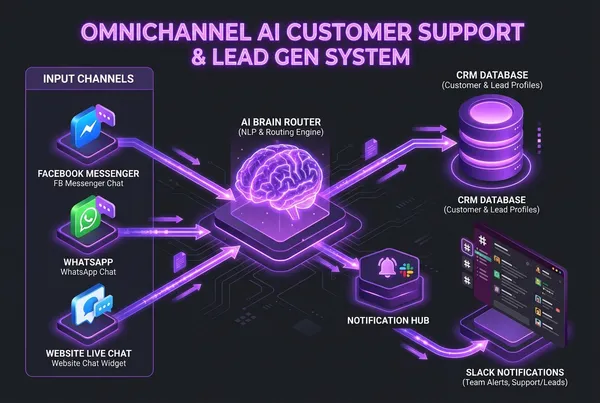
Architecting Omnichannel AI Customer Support & Automated Lead Systems
How to capture, qualify, and convert leads 24/7 across Website Live Chat, Facebook Messenger, and WhatsApp with intelligent AI routing, webhook automation, and instant CRM sync.

Building Production-Grade Multi-Agent Systems with LangGraph and Human-in-the-Loop
An architectural deep-dive on designing resilient, stateful multi-agent workflows with LangGraph, cyclic graphs, Redis checkpointing, and deterministic guardrails.